Your home, in hand.
Domiara is a fast, modern app for your TouchWand‑powered smart home — on iPhone and Android. Lights, shutters, climate, and scenes — at home over your local network, or anywhere through your own cloud account. Private by design: no ads, no analytics, no tracking.
Available now · App Store & Google PlayIndependent app — not affiliated with TouchWand. Try demo mode with no account and no hardware.
The app disappeared. Your home didn't.
The official TouchWand+ iPhone app is gone from the App Store, leaving many iPhone owners stuck with a web page to run their home. Domiara brings full, native iPhone control back — to the exact TouchWand system you already own. No controller swap. No rewiring. No new account.
- ✓Keep your current TouchWand hub and switches — nothing to replace.
- ✓Sign in with the account you already have.
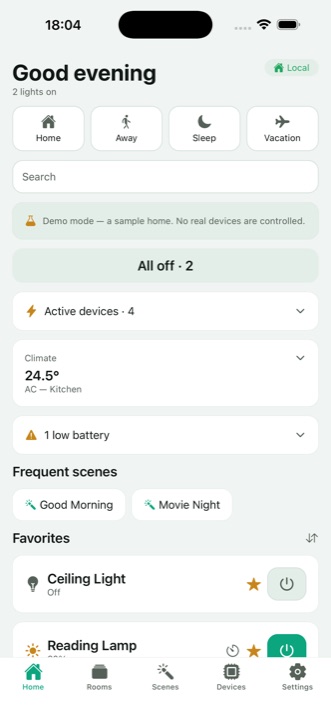
- ✓Lights, shutters, climate & scenes — one tap from your Home screen.
- ✓Works at home over Wi‑Fi and away through your own cloud.
- ✓Hebrew & English, dark & light, full VoiceOver support.
- ✓Private by design — no ads, no analytics, no tracking.
Designed for everyday use
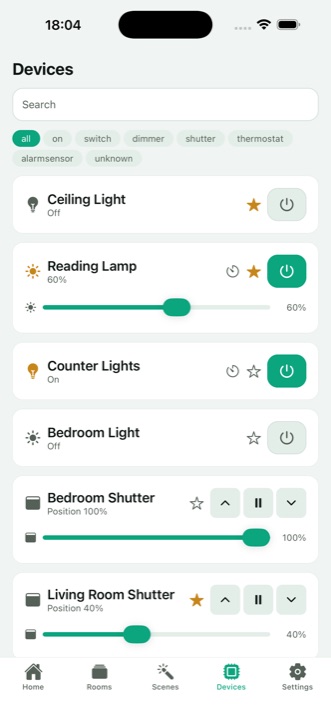
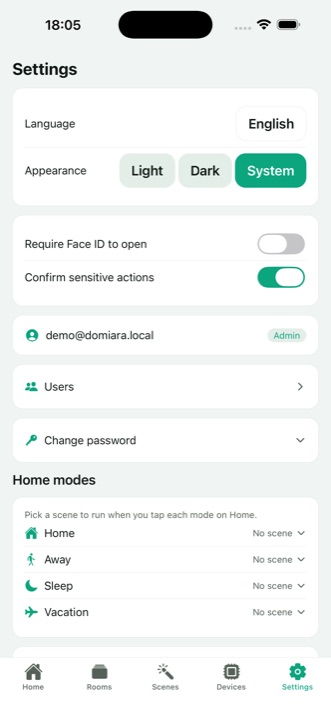
Everything your home does, one tap away
Built from scratch as a fast, careful iOS app — with the details that make daily control feel effortless.
Everyday control
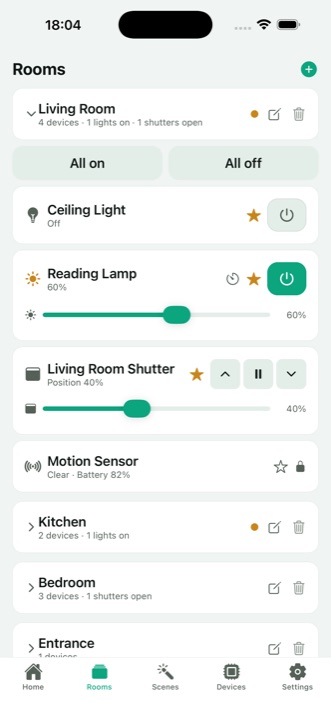
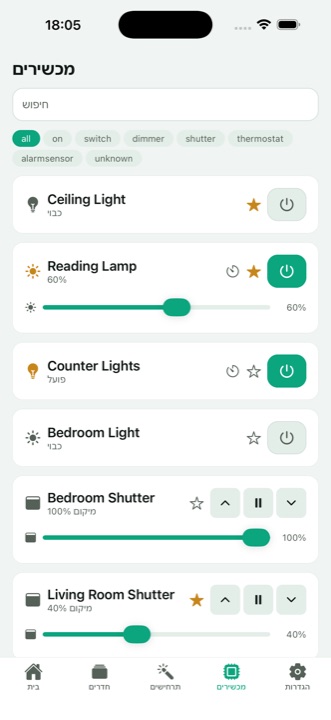
Switch lights on and off, dim to the exact level, set shutter positions with smooth sliders, and adjust the thermostat right on the card.
Rooms & groups
See each room at a glance, control it as one — including "all on / all off" — and group any devices for a single tap.
Scenes
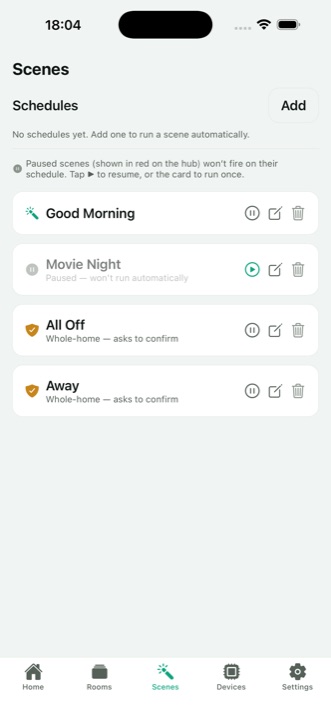
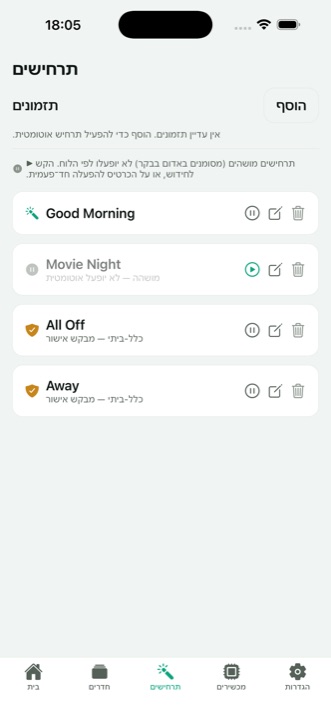
Run your scenes with one tap. Pause, resume, rename — and change the time of your daily scheduled scenes right from the app.
Schedules & timers
Schedule scenes by time and weekday, or set a countdown — "turn off in 20 minutes" — with a notification when it fires.
Home modes & solar automation
Home, Away, Sleep, Vacation — each bound to a scene. A solar‑aware automation engine can follow sunrise and sunset, not just the clock.
Find things fast
Instant search, an active‑devices view of everything currently on, and favorites you can reorder to match how you live.
Built for the household
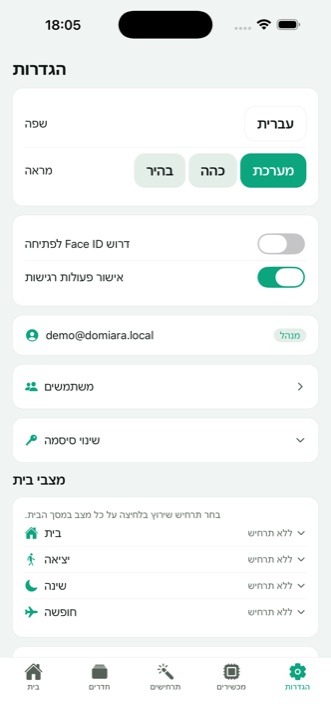
User management with real roles — User, Admin, Technician — plus add, edit, and remove users, in‑app password change, and an optional Face ID app lock.
Hebrew & English, dark & light
Full Hebrew and English localization with true right‑to‑left layout, dark and light themes, and a demo mode that needs no account at all.
Your own dashboards
Create zones — "Kitchen", "Bedroom shutters" — as grids of one‑tap tiles, and arrange them with drag‑and‑drop. Your home, your layout.
Home‑screen widget
See your favorite devices live — and flip them, run All Off, or switch modes — straight from the iPhone home screen.
Siri — in Hebrew too
Every scene is available to Siri by its real name, including Hebrew ones: "היי Siri, הפעל לילה טוב ב‑Domiara".
Apple Home, Google Home & Home Assistant
Free, open-source connectors bring everything into Apple Home, Google Home, and Home Assistant — rooms included — all running locally on your own network.
RF remotes — fans, blinds, fireplaces
Got a BroadLink hub? Domiara learns the buttons on your handsets and presses them for you, right beside your other devices. Runs entirely on your home Wi‑Fi, with no BroadLink account.
Energy insights
Power‑metered devices show their last‑7‑days consumption and totals — see what your home actually uses.
Android — on Google Play
Domiara runs on Android too — now live on Google Play. The whole household covered.
Your TouchWand home, inside Apple Home, Google Home & Home Assistant
Lights, shutters, climate and scenes — in the Home app and Siri.
Domiara Bridge is a small companion service that runs on any always‑on computer on your home network (a Raspberry Pi, a NAS, a mini‑PC) and mirrors your existing TouchWand system into Apple Home. Control everything from the Home app, ask Siri in your own words, and use Apple automations — with your current controller, no hardware replacement. Built on the same field‑tested engine as the Domiara app. And when the accessories land in Apple Home, the Domiara app imports your TouchWand rooms in one tap — no manual sorting of dozens of devices. Prefer Home Assistant? The native domiara integration connects your controller directly — devices arrive pre-sorted into areas named after your rooms, updating live — and from there a local Matter bridge puts everything in Google Home too. No clouds, no subscriptions.
Free & open source — install homebridge-domiara from the Homebridge plugin search. Step-by-step setup guides: Apple Home · Home Assistant · Google Home.
Your home talks to you. Nobody else.
Most smart‑home apps route your home through someone's servers. Domiara doesn't have any.
No Domiara servers. The app talks only to your own controller on your local network, or to your own TouchWand cloud account — over TLS.
No analytics, no ads, no tracking. No data collection by the developer. The App Store privacy label is simply "Data Not Collected."
Credentials stay in the iOS Keychain on your device. Signing out removes them. Domiara keeps no copy of your account.
Diagnostics are redacted on‑device. Credentials, tokens, emails, IPs, and names never appear in logs or exports.
Works with your existing TouchWand hub
No new hardware. No new account.
Domiara is compatible with TouchWand Wanderfull hubs and signs in with the account you already use — it has no accounts of its own. At home it connects directly over your local network; away from home it reaches your controller through your own cloud account. No TouchWand hub yet? Demo mode lets you explore a fully interactive sample home with no account and no hardware.
Give your TouchWand customers their iPhone app back
If you install or service TouchWand systems, your iPhone customers have lost their app too. Point them to Domiara — a modern, private iPhone client that works with the controllers already on their walls, so you can keep them happy without a forced hardware upgrade.
It's free today — and open to working together.
Domiara is currently free, with no ads and no paywall on core control. If you'd like to offer it to your customers, co‑brand it, bundle onboarding, or explore a partnership, I'd love to talk. Reach out and let's build something that keeps existing TouchWand homes first‑class.
Good questions, quick answers
What do I need to use Domiara?
An iPhone, a TouchWand controller (hub) in your home, and your existing account for it. Demo mode needs none of those.
Do I create a Domiara account?
No. Domiara has no accounts of its own — you sign in with the account you already use with your controller.
Why can't I see user management?
Domiara respects your controller's roles. Everyday control works for everyone; administrative features appear only for Admin and Technician accounts.
הבית שלכם, בכף היד.
Domiara היא אפליקציה מהירה ומודרנית לבית החכם שלכם מבוסס TouchWand — לאייפון ולאנדרואיד. תאורה, תריסים, מיזוג וסצנות — בבית דרך הרשת המקומית, ומכל מקום דרך חשבון הענן שלכם. פרטית מעצם התכנון: בלי פרסומות, בלי אנליטיקה ובלי מעקב.
זמינה עכשיו · ב‑App Store וב‑Google Playאפליקציה עצמאית — אינה קשורה ל‑TouchWand. נסו את מצב ההדגמה בלי חשבון ובלי חומרה.
האפליקציה נעלמה. הבית שלכם לא.
האפליקציה הרשמית של TouchWand לאייפון ירדה מה‑App Store, והשאירה בעלי אייפון רבים תקועים עם אתר אינטרנט לניהול הבית. Domiara מחזירה שליטה מלאה ומקורית מהאייפון — בדיוק למערכת ה‑TouchWand שכבר יש לכם. בלי החלפת בקר. בלי חיווט מחדש. בלי חשבון חדש.
- ✓שומרים על הבקר והמתגים הקיימים — אין מה להחליף.
- ✓מתחברים עם החשבון שכבר יש לכם.
- ✓תאורה, תריסים, מיזוג וסצנות — בנגיעה אחת ממסך הבית.
- ✓עובדת בבית דרך ה‑Wi‑Fi ומחוץ לבית דרך חשבון הענן שלכם.
- ✓עברית ואנגלית, כהה ובהיר, ותמיכה מלאה ב‑VoiceOver.
- ✓פרטית מעצם התכנון — בלי פרסומות, בלי אנליטיקה ובלי מעקב.
מעוצבת לשימוש יומיומי
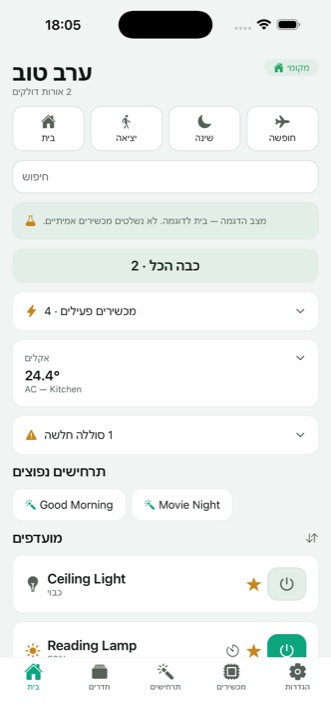
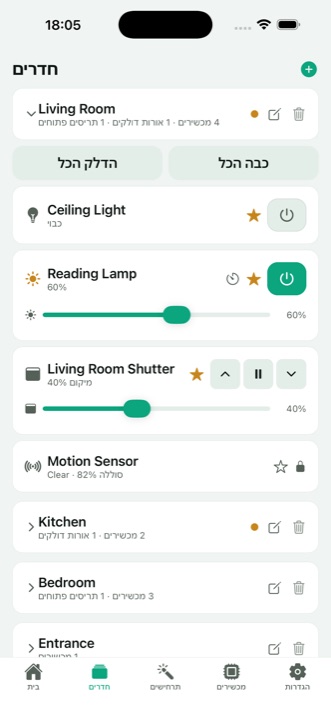
כל מה שהבית שלכם יודע לעשות, במרחק נגיעה
נבנתה מאפס כאפליקציית iOS מהירה ומוקפדת — עם הפרטים הקטנים שהופכים שליטה יומיומית לקלה באמת.
שליטה יומיומית
הדלקה וכיבוי של תאורה, עמעום מדויק, כיוון גובה תריסים עם מחוונים חלקים, וכיוון תרמוסטט ישירות מהכרטיס.
חדרים וקבוצות
רואים כל חדר במבט אחד ושולטים בו כיחידה — כולל "הדלק הכל / כבה הכל" — ומקבצים מכשירים לקבוצה בנגיעה אחת.
סצנות
מפעילים סצנות בנגיעה אחת, משהים, מחדשים ומשנים שמות — וגם משנים את שעת התזמון של סצנות יומיות ישירות מהאפליקציה.
תזמונים וטיימרים
מתזמנים סצנות לפי שעה וימים בשבוע, או קובעים טיימר — "כבה בעוד 20 דקות" — עם התראה בסיום.
מצבי בית ואוטומציה סולארית
בבית, מחוץ לבית, שינה, חופשה — כל מצב מקושר לסצנה. מנוע אוטומציה מודע‑שמש שיכול לעקוב אחרי זריחה ושקיעה, לא רק אחרי השעון.
מוצאים הכול, מהר
חיפוש מיידי, תצוגת מכשירים פעילים של כל מה שדולק כרגע, ומועדפים שאפשר לסדר מחדש בדיוק כמו שנוח לכם.
מותאם לכל בני הבית
ניהול משתמשים עם תפקידים אמיתיים — משתמש, מנהל, טכנאי — הוספה, עריכה והסרה של משתמשים, שינוי סיסמה מתוך האפליקציה ונעילת Face ID אופציונלית.
עברית ואנגלית, כהה ובהיר
עברית ואנגלית מלאות עם פריסה אמיתית מימין לשמאל, ערכות נושא כהה ובהירה, ומצב הדגמה שלא דורש שום חשבון.
לוחות בקרה משלכם
יוצרים אזורים — "מטבח", "תריסי חדר שינה" — כרשתות של אריחים בנגיעה אחת, ומסדרים בגרירה. הבית שלכם, הפריסה שלכם.
ווידג'ט למסך הבית
רואים את המכשירים המועדפים חיים — ומדליקים/מכבים, מפעילים כיבוי כללי או מחליפים מצב — ישירות ממסך הבית של האייפון.
Siri — גם בעברית
כל סצנה זמינה ל‑Siri בשמה האמיתי, כולל בעברית: "היי Siri, הפעל לילה טוב ב‑Domiara".
Apple Home, Google Home ו‑Home Assistant
מחברים חינמיים בקוד פתוח מכניסים הכול ל‑Apple Home, ל‑Google Home ול‑Home Assistant — כולל החדרים — והכול רץ מקומית ברשת שלכם.
שלטי RF — מאווררים, תריסים, קמינים
יש לכם רכזת BroadLink? Domiara לומדת את הכפתורים שבשלטים שלכם ולוחצת עליהם בשבילכם, לצד שאר המכשירים. הכול רץ על ה‑Wi‑Fi הביתי, בלי חשבון BroadLink.
תובנות אנרגיה
מכשירים עם מד צריכה מציגים את הצריכה של 7 הימים האחרונים וסיכומים — לראות מה הבית באמת צורך.
אנדרואיד — ב‑Google Play
Domiara רצה גם על אנדרואיד — זמינה עכשיו ב‑Google Play. כל בני הבית מכוסים.
הבית החכם שלכם, בתוך Apple Home
תאורה, תריסים, מיזוג וסצנות — באפליקציית הבית וב‑Siri.
Domiara Bridge הוא שירות נלווה קטן שרץ על כל מחשב שדולק תמיד ברשת הביתית (Raspberry Pi, NAS, מיני‑מחשב) ומשקף את מערכת ה‑TouchWand הקיימת שלכם לתוך Apple Home. שולטים בהכול מאפליקציית הבית, מבקשים מ‑Siri במילים שלכם ומשתמשים באוטומציות של Apple — עם הבקר הנוכחי, בלי להחליף חומרה. בנוי על אותו מנוע מוכח־שטח של אפליקציית Domiara.
חינמי וקוד פתוח — התקינו את homebridge-domiara מחיפוש התוספים של Homebridge. מדריכי התקנה: Apple Home · Home Assistant · Google Home.
הבית שלכם מדבר איתכם. עם אף אחד אחר.
רוב אפליקציות הבית החכם מעבירות את הבית שלכם דרך שרתים של מישהו. ל‑Domiara פשוט אין כאלה.
אין שרתים של Domiara. האפליקציה מתקשרת רק עם הבקר שלכם ברשת המקומית, או עם חשבון הענן של TouchWand שלכם — בהצפנת TLS.
בלי אנליטיקה, בלי פרסומות, בלי מעקב. בלי איסוף נתונים על ידי המפתח. תווית הפרטיות ב‑App Store היא פשוט "Data Not Collected".
פרטי ההתחברות נשמרים רק ב‑Keychain של iOS במכשיר שלכם. יציאה מהחשבון מוחקת אותם. ל‑Domiara אין שום עותק של החשבון שלכם.
קובצי אבחון עוברים השחרה במכשיר. פרטי התחברות, טוקנים, כתובות אימייל, כתובות IP ושמות לעולם אינם מופיעים ביומנים או בייצוא.
עובדת עם בקר ה‑TouchWand שכבר יש לכם
בלי חומרה חדשה. בלי חשבון חדש.
Domiara תואמת לבקרי TouchWand Wanderfull ומתחברת עם החשבון שאתם כבר משתמשים בו — אין לה חשבונות משלה. בבית היא מתחברת ישירות דרך הרשת המקומית; מחוץ לבית — דרך חשבון הענן שלכם. אין לכם עדיין בקר TouchWand? מצב ההדגמה מאפשר לחקור בית לדוגמה, אינטראקטיבי לגמרי, בלי חשבון ובלי חומרה.
תחזירו ללקוחות ה‑TouchWand את האפליקציה לאייפון
אם אתם מתקינים או מתחזקים מערכות TouchWand, גם ללקוחות האייפון שלכם נעלמה האפליקציה. הפנו אותם ל‑Domiara — אפליקציית אייפון מודרנית ופרטית שעובדת עם הבקרים שכבר על הקיר, כדי לשמור על לקוחות מרוצים בלי שדרוג חומרה כפוי.
חינם היום — ופתוח לשיתוף פעולה.
Domiara חינמית כרגע, בלי פרסומות ובלי חסימת תשלום על שליטה בסיסית. אם תרצו להציע אותה ללקוחות, למתג אותה יחד, לשלב אונבורדינג או לבחון שותפות — אשמח לדבר. צרו קשר ונבנה יחד משהו ששומר על בתי TouchWand הקיימים במקום הראשון.
שאלות טובות, תשובות מהירות
מה צריך כדי להשתמש ב‑Domiara?
אייפון, בקר (רכזת) TouchWand בבית, והחשבון הקיים שלכם עבורו. מצב ההדגמה לא דורש אף אחד מהם.
צריך לפתוח חשבון Domiara?
לא. ל‑Domiara אין חשבונות משלה — מתחברים עם החשבון שאתם כבר משתמשים בו עם הבקר.
למה אני לא רואה ניהול משתמשים?
Domiara מכבדת את תפקידי הבקר שלכם. שליטה יומיומית זמינה לכולם; יכולות ניהול מוצגות רק לחשבונות מנהל וטכנאי.